Help & Support
SEARCH
Instagram simplifies viral video creation with new Picture-in-Picture reference tool
SHARE IT
Replicating viral short-form videos has long been a tedious and time-consuming ordeal for digital creators. Whether attempting to master intricate dance routines, precise lip-syncing, or rapid scene transitions, users have traditionally been forced to watch an original clip repeatedly, memorize the sequence, and hope their timing aligns when they finally hit record. This trial-and-error approach often results in dozens of scrapped takes and significant frustration. Recognizing this daily hurdle faced by millions on its platform, Meta has moved to streamline the in-app production workflow with a new feature designed to cut down preparation time and boost accuracy.
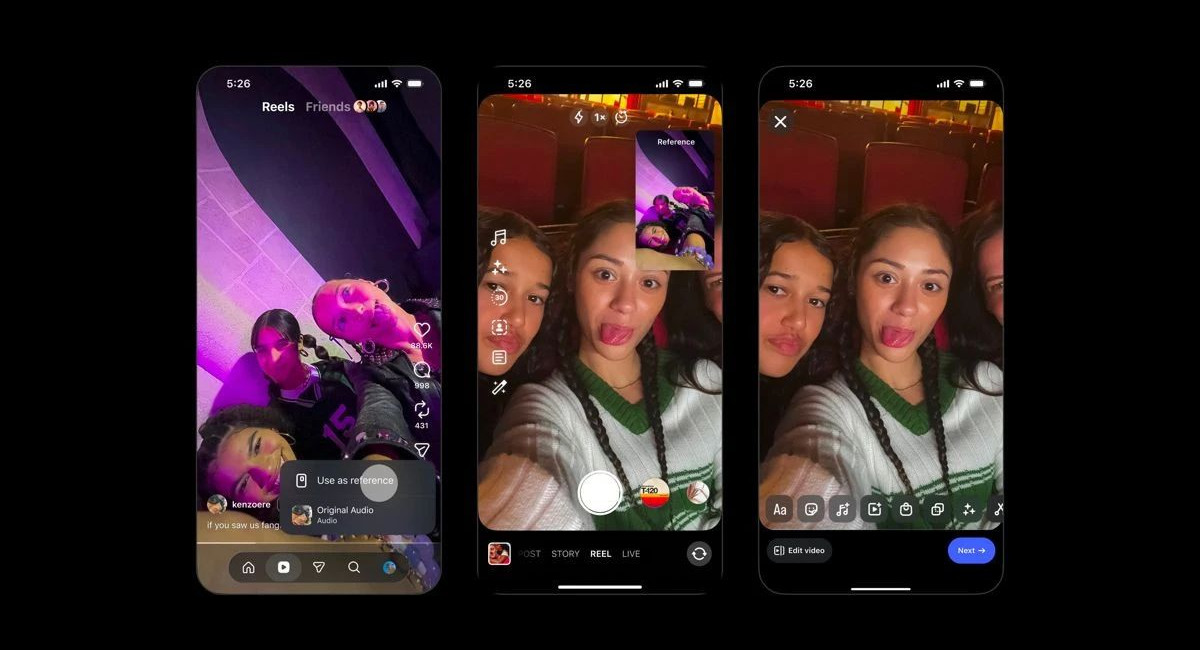
Instagram is officially tackling the memorization bottleneck by introducing an integrated in-camera solution that keeps a reference video continuously visible on the screen during recording. Operating much like a standard picture-in-picture interface, this addition allows creators to watch the original clip play out in real time while simultaneously capturing their own version. By placing a live visual guide directly alongside the camera feed, the feature eliminates the guesswork of timing and lets users focus entirely on their performance, physical execution, and facial expressions.
Accessing the new functionality is straightforward and requires no external editing software. Users simply locate a Reel they wish to recreate, tap the three-dot options menu, and select the new Use as reference command. Triggering this option immediately launches the Instagram camera with the selected video playing inside a compact, floating window.The interface has been engineered with workspace flexibility in mind, treating the reference overlay as an independent element that assists the creator without obstructing their primary view.
To ensure the floating guide never gets in the way of a shot, Instagram gives users full spatial control over their screen layout. Creators can freely reposition the picture-in-picture window to any corner or edge of the display using a simple drag-and-drop gesture, keeping their face or full-body framing completely clear. Furthermore, the tool incorporates playback controls that allow users to pause the reference clip as often as necessary. This makes it far easier to rehearse isolated, high-difficulty segments of a trend before committing to a full recording.
Beyond spatial flexibility, the update addresses one of the most notorious pain points in short-form video production:starting on beat. Instagram has built a customizable countdown timer directly into the reference workflow. This addition enables creators to set a personalized buffer before both the camera and the reference clip begin rolling simultaneously.Achieving frame-accurate synchronization from the very first second is critical for lip-syncing and choreography, where even a fraction of a second of delay can throw off the entire rhythm of a post.
Despite its utility, the feature currently comes with a strict duration boundary. Meta has configured the tool to support only reference Reels that are 90 seconds or shorter. While the company has not issued a formal technical breakdown explaining this cap, keeping the overlay restricted to shorter clips likely helps preserve smooth app performance and prevents excessive memory or battery drain on mobile hardware during simultaneous playback and recording. As the underlying code is optimized in future updates, Meta may eventually expand this time limit to accommodate longer-form creators.
In keeping with its standard deployment strategy for major updates, Meta is rolling out the reference tool in phases across mobile ecosystems. The picture-in-picture guide is already live for users on Apple iOS devices, allowing iPhone owners to immediately begin testing the streamlined workflow. Meanwhile, creators on Android smartphones will have to wait a little longer, as the company has confirmed that support for the operating system is scheduled to arrive in the near future,though no exact release date has been specified.
MORE NEWS FOR YOU