 Help & Support
 SEARCH
Google Maps for iOS just got smarter
SHARE IT
Google Maps on iOS is receiving a practical new upgrade, one designed for anyone who has ever wandered around a parking lot trying to remember where they left their car. The feature, quietly rolled out but confirmed by Google Maps senior product manager Rio Akasaka and reported by MacRumors, aims to remove one everyday frustration by doing the remembering for you.
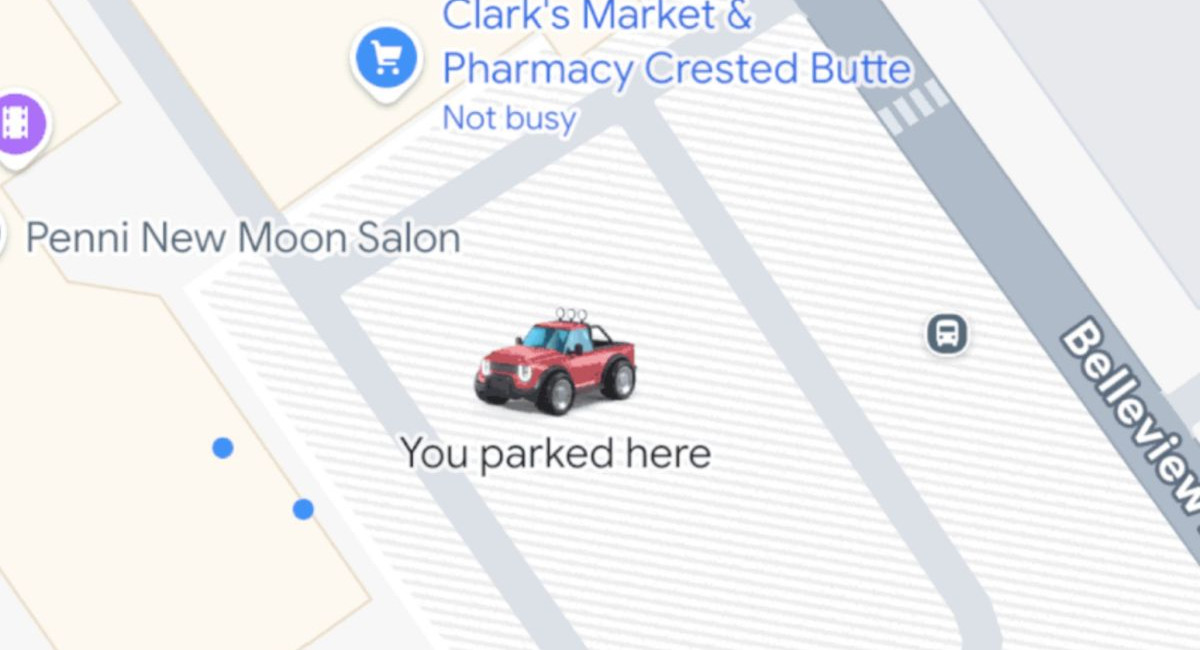
The concept is simple: once your iPhone is connected to your car through CarPlay, Bluetooth, or even USB, Google Maps will automatically record your parking spot at the end of your drive. There is no setup required beyond ensuring that the connection is active while you are driving. As soon as you switch off the engine and walk away, a pin will appear on the map labeled You parked here. It’s a small change, but one that could save precious minutes and prevent more than a few moments of confusion.
The pin isn’t permanent. As soon as you start your vehicle and drive away, Google Maps clears the marker to keep your map clean and avoid clutter. It is a self-resetting system meant to work in the background, offering help only when it’s needed. For users juggling errands, navigating large garages, or parking in unfamiliar neighborhoods, the upgrade delivers a convenience that feels long overdue.
This isn’t the first time Google Maps has offered tools to help you track your parking spot. The app has long included the Save where you parked option, which requires you to set the location manually. That feature is still available, along with tools that highlight parking availability in busy areas. But the new auto-save feature streamlines the experience by taking out the manual step. There’s no need to remember to mark your location; the app does it automatically as long as your phone is properly connected to your car.
Google has also paired the feature with a small visual enhancement rolled out last week. If you’ve chosen a custom vehicle icon for navigation — a fun extra that replaces the standard blue arrow — the same icon will appear on the map at your parking spot. It’s a minor update, but it adds a bit of personality and makes the pin easier to spot at a glance. Instead of the generic P symbol, you’ll now see your selected car avatar waiting where you left it.
For those unfamiliar with the custom icon option, accessing it is straightforward. Open Google Maps, start Navigation to activate the driving view, tap on the blue arrow or your existing car avatar, and then swipe through the available designs to choose the one you prefer. Once selected, Google Maps applies it instantly, and now, thanks to the latest update, that icon doubles as your parking spot indicator.
The addition of automated parking reminders comes at a time when Google is steadily refining Google Maps across both iOS and Android. Over the past year, the company has introduced a range of improvements, from real-time environmental data overlays to more detailed public transit insights. The parking update falls into a growing category of small usability features designed to smooth out everyday friction points. Unlike major redesigns or bold new navigation tools, these incremental improvements focus on convenience — the kind that becomes invaluable precisely because it’s easy to forget.
For iOS users in particular, this update brings Google Maps closer in line with Apple Maps, which has long offered its own automatic parking detection when connected to CarPlay. The move makes Google’s app equally competitive on Apple’s ecosystem while maintaining the familiar interface many users prefer.
The update also underscores Google’s continued commitment to feature consistency across platforms. While the automatic parking reminder is now confirmed on iOS, similar functionality has been appearing on Android as well, showing that Google intends for this to become a standard part of the Maps experience regardless of device.
As of now, no extra permissions are required beyond the usual location access that Google Maps needs for navigation. The feature should work immediately for most users who have updated their app. If the automatic marker doesn’t appear, the most likely culprit is a missing or inactive connection between the iPhone and the car — something easily fixed by checking Bluetooth settings or reconnecting CarPlay.
MORE NEWS FOR YOU