 Help & Support
 SEARCH
Google’s Circle to Search takes aim at online scams
SHARE IT
Scam attempts have been rising at an alarming rate, fueled in part by the increasing accessibility of advanced AI tools. Malicious actors have become more sophisticated, crafting messages that look authentic and manipulating online content in ways that make fraud harder to detect. In response to this growing challenge, Google is equipping one of its most innovative features—Circle to Search—with a new layer of protection designed to help users identify potential scams before they fall victim to them.
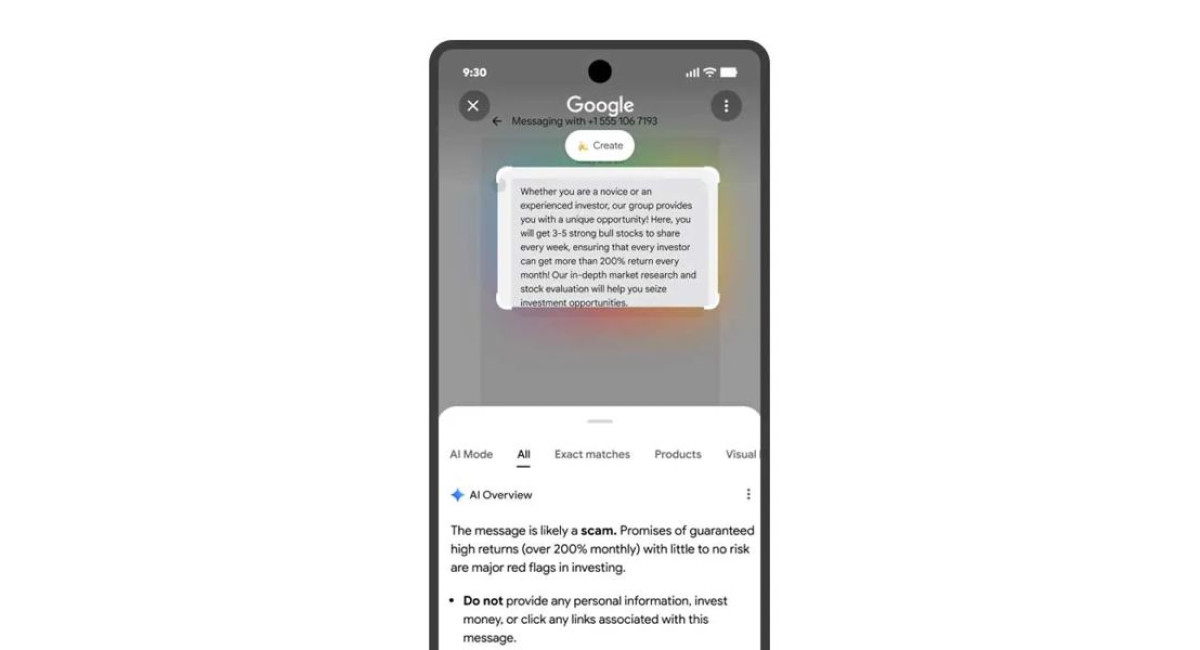
The latest upgrade allows Circle to Search to analyze suspicious text in real time, whether it appears in a direct message, an email preview, a webpage, or any other on-screen content. When a user activates the feature and circles a concerning snippet, the system automatically opens an AI Overview panel. There, Google’s AI breaks down the elements of the message, explaining why it may be fraudulent and offering practical advice on what to do next.
This function isn’t limited to one type of scam. According to Google, many online fraud attempts follow recognizable patterns—pressure tactics, unexpected requests for personal details, unverified payment links, or impersonation of a known company. While scammers continually evolve their techniques, their messages often contain red flags that experienced users may overlook. Circle to Search is meant to highlight those clues consistently and clearly, serving as an additional layer of defense.
Google describes the new feature as a way to give users peace of mind. By letting people evaluate suspicious messages directly from the screen they’re on, it reduces the need to switch apps or copy text into another service for verification. The AI Overview pulls information from across the web, analyzing common scam structures and comparing them to the user’s selection. After reviewing the content, the tool presents a short explanation of whether the message fits known scam patterns and suggests actions such as ignoring, reporting, or blocking the sender.
The capability also extends to Google Lens. If a user takes a screenshot of a questionable message or captures text appearing outside a traditional messaging app, they can upload that image to Lens and receive the same scam-analysis functionality. This makes the system flexible enough to identify fraudulent content no matter where it appears—on social media, in a pop-up window, or even within an online ad.
The timing of this announcement aligns with Google’s broader rollout of the Android 16 QPR2 update. That update introduces several new safety and usability features, indicating Google’s heightened focus on digital well-being. Among the additions is a streamlined method for exiting unwanted group chats, helping users escape spammy or intrusive conversations more quickly. Another enhancement gives callers the ability to mark an outgoing call as urgent, ensuring the recipient understands the importance of the communication even before picking up.
However, while most Android 16 QPR2 features are expected to reach devices relatively quickly, the expanded scam detection within Circle to Search will have a more gradual rollout. Google emphasizes that it will become broadly available only once the company’s systems have what it describes as “high confidence in the quality of the response.” This cautious approach suggests the company is prioritizing accuracy over speed, aiming to avoid false positives that could confuse users or undermine trust in the feature.
Still, the global release of the upgraded Circle to Search marks an important moment in the ongoing battle against online fraud. As more scammers leverage AI tools to emulate genuine conversations and mimic trusted brands, people increasingly need AI-driven countermeasures that help them make informed decisions. Google’s new approach blends convenience with safety, placing scam detection directly within a tool many Android users already rely on for visual and text-based searches.
MORE NEWS FOR YOU