 Help & Support
 SEARCH
Google Photos rolls out 5 new tools to elevate mobile video editing
SHARE IT
Google is giving its Photos app a significant creative boost with a suite of new video editing features designed to make producing polished highlight reels easier and more intuitive. The company announced that users on Android and iOS will now be able to take advantage of redesigned editing tools, fresh templates, customizable text options and expanded soundtrack controls, all aimed at helping people turn everyday clips into more expressive stories.
For years, Google Photos has offered a simple way to bundle pictures and short videos into a single highlight video. By selecting the Create tab and choosing the highlight video option, users could rely on the app’s automated system to stitch together a cohesive montage from their chosen content. But while convenient, the feature left many users wanting more control, more flair and more personalization. These latest updates are Google’s answer to that demand.
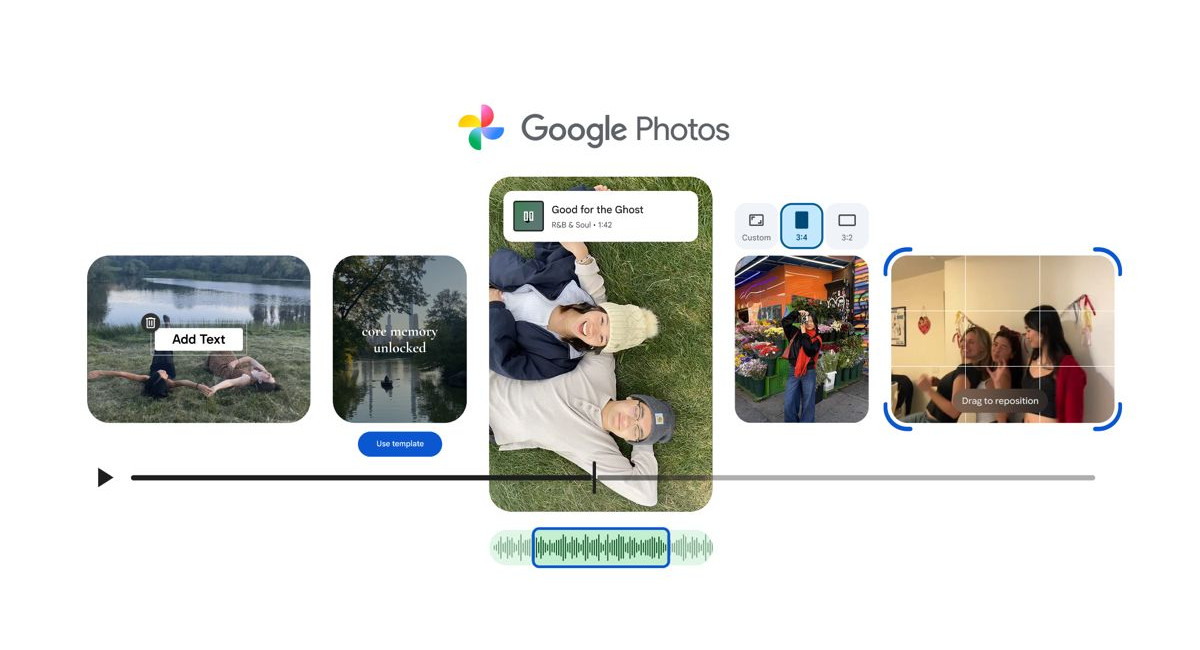
The most notable addition is a new set of ready-made templates designed for those who want an attractive result without fussing over technical details. Now rolling out on Android, the templates include built-in transitions, text elements and music that automatically syncs to the beat. After selecting a template and choosing the photos and video clips to include, Google Photos handles the rest, generating an edited video that is instantly shareable. Google says more template options are on the way, making it easier for users to choose a style that matches the tone of their content.
Alongside templates, Google has introduced a redesigned video editor for both Android and iOS, with an emphasis on speed, accessibility and creative flexibility. The new interface offers a universal timeline view, giving users a clearer picture of how clips and edits fit together. Multi-clip editing is now simpler, and the adaptive canvas ensures that all visual elements are easy to reposition and adjust. According to Google, the goal was to keep everything exactly where users expect to find it. This reduces the learning curve and shortens the time between selecting content and producing a finished video.
Music has always been a powerful storytelling tool, and Google Photos now gives users more direct control over the soundscape of their highlight reels. The updated features include a streamlined way to browse the app’s growing music library and integrate tracks that better match the mood of a video. Whether users want something sentimental, upbeat or cinematic, they can select and apply a soundtrack with only a few taps. This enhancement is available across Android and iOS, making it easier than ever to craft a video that resonates emotionally.
For those who want their videos to carry a distinct narrative or aesthetic touch, Google is also introducing expanded options for custom text overlays. Available on Android, the feature lets users place text directly on their videos, choosing from new fonts, colors and background styles. Whether adding captions for clarity, dates for memory-keeping or artistic text to complement a theme, the feature is designed to help users personalize their creations beyond simple visual edits.
Individual clip editing is also receiving an upgrade. The redesigned video editor now becomes the default tool on Android when opening a single video from the gallery. Users can trim, adjust and enhance clips with the same streamlined interface used for highlight videos. On top of that, music and text can now be added to standalone clips, giving even quick, casual videos a more polished and intentional finish.
Together, these five new features position Google Photos as a more capable creative toolkit, bridging the gap between simple automatic video generation and full-fledged editing software. Google’s goal appears to be clear: empower users to create dynamic, meaningful videos without having to switch apps or rely on complex tools. Whether users want to assemble a quick recap of a weekend trip or craft a carefully structured montage, the updated Google Photos offers everything needed to shape a personal story from the moments captured on their phone.
Most of these features are already available, with additional components gradually rolling out. As Google continues refining its editing tools, the Photos app is increasingly becoming not just a storage solution, but a versatile platform for storytelling.
MORE NEWS FOR YOU