 Help & Support
 SEARCH
WhatsApp will soon support multiple accounts
SHARE IT
Despite not having as many features as some of its main competitors, WhatsApp remains one of the most popular instant messaging programs. WhatsApp has been working steadily to introduce some of the most desired features to its platform. The option to utilize your WhatsApp account on various devices was added to the IM app earlier this year. The service has now revealed that users will be able to utilize numerous WhatsApp accounts on a single device.
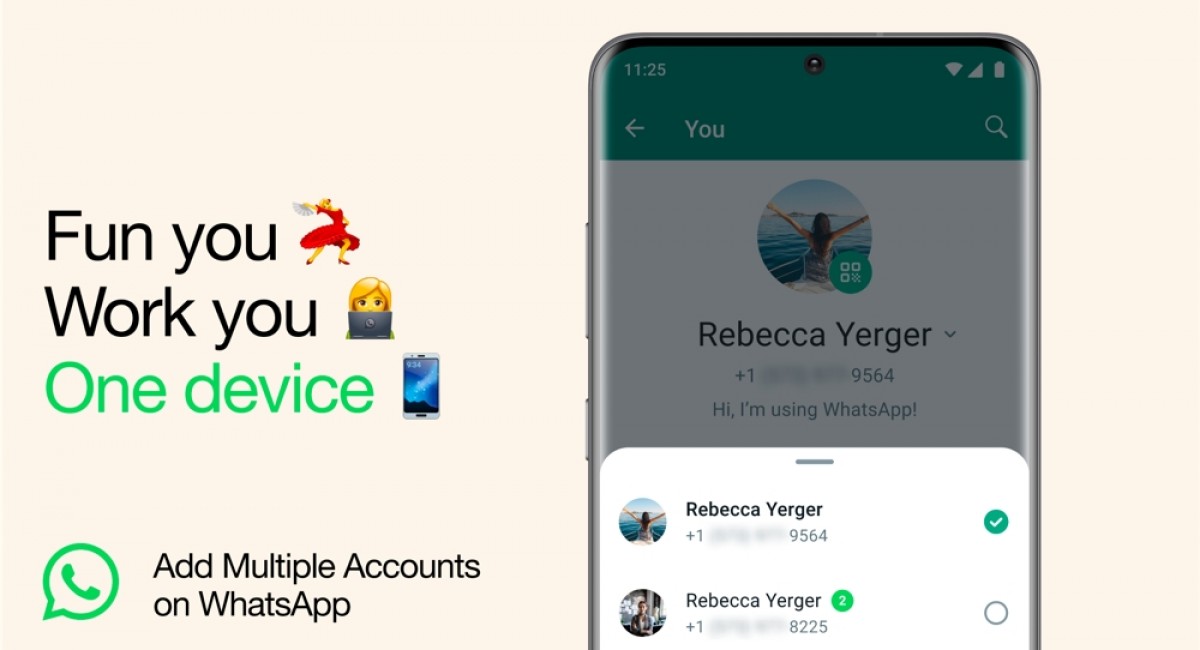
According to the release, WhatsApp is adding the possibility to have two accounts logged in to the official app at the same time. The update is being sent out starting today, so you should start seeing it on your Android and iOS devices shortly.
Previously, users had to rely on capabilities such as dual applications on some Android skins and the WhatsApp Business app on iOS to utilize two numbers on WhatsApp at the same time. This modification makes it possible to utilize a different account for business and another for personal connections on the official app without having to go through onerous procedures. You won't have to log out, and you won't have to carry two phones.
The notification states "multiple accounts," yet the instructions only apply to a second account. Given that each account requires an active phone number, it's possible that the app will limit you to two accounts on a phone, as phones don't currently allow three active SIM cards at the same time.
A second phone number and SIM card in your phone are required to create a second WhatsApp account. This SIM card might be a traditional SIM card or an eSIM.
Once you have two phone numbers on your phone, follow these steps:
- Open WhatsApp.
- Go to Settings.
- Click on the arrow next to your name.
- Click “Add account” and follow the on-screen instructions to set up your second profile.
On each account, you may customize your privacy and notification settings.
If you don't see the arrow next to your name, check the Google Play Store/Apple App Store for a pending WhatsApp app update and install it. If it is still unavailable, you will have to wait for WhatsApp to add the functionality to your phone.
MORE NEWS FOR YOU