 Help & Support
 SEARCH
Android 17 is now official and rolling out to Pixel devices
SHARE IT
Google has officially pulled back the curtain on Android 17, rolling out the highly anticipated operating system upgrade to its flagship Pixel devices. In a shift from the industry trend of flashy, superficial gimmicks, the tech giant has delivered a release focused heavily on practical productivity, robust security protocols, and deep, behind-the-scenes system optimizations designed to elevate the daily user experience.
At the forefront of the new software experience is a reimagined multitasking ecosystem known as Bubbles. Moving far beyond traditional split-screen setups, this feature allows users to transform any application into a compact, floating window simply by long-pressing its home screen icon. For large-format devices like tablets and foldables, Google introduced a dedicated bubble bar at the bottom of the screen. This taskbar acts as a staging ground where floating applications can be tucked away, resized instantly, or maximized back to full screen with a single tap. The system effectively eliminates the friction of constantly jumping back and forth through the recent apps menu, providing a massive boost to on-the-go productivity.
Content creators are also getting a substantial native toolset with the introduction of Screen Reactions. Built directly into the system-level screen recording utility, this tool allows users to capture their on-screen activities while simultaneously recording themselves via the front-facing selfie camera. The software automatically handles the heavy lifting by isolating the user's face and overlaying it cleanly on top of websites, apps, or video gameplay, completely removing the need for a physical green screen or complex, third-party desktop editing suites.
Recognizing the unique demands of the growing foldable market, the update introduces a specialized Foldable gaming mode. When activated, the operating system splits the expansive inner display into a perfect 50/50 layout, positioning the main gaming action on the top half while converting the bottom half into a dynamic, fully digital gamepad. For gaming purists who prefer physical accessories, the software now includes system-level controller remapping, giving users the freedom to rebind external controller inputs directly from the main settings menu without relying on companion apps.
Beneath the surface, Google is executing a highly aggressive strategy regarding device performance and resource management. The operating system now enforces strict RAM limits on background applications, preventing them from hoarding memory and draining the battery when not actively in use. This backend cleanup utility kicks into high gear during demanding gaming sessions, rapidly clearing out clogged system resources to eliminate sudden frame drops and micro-stutters, resulting in a noticeably smoother, more consistent frame rate.
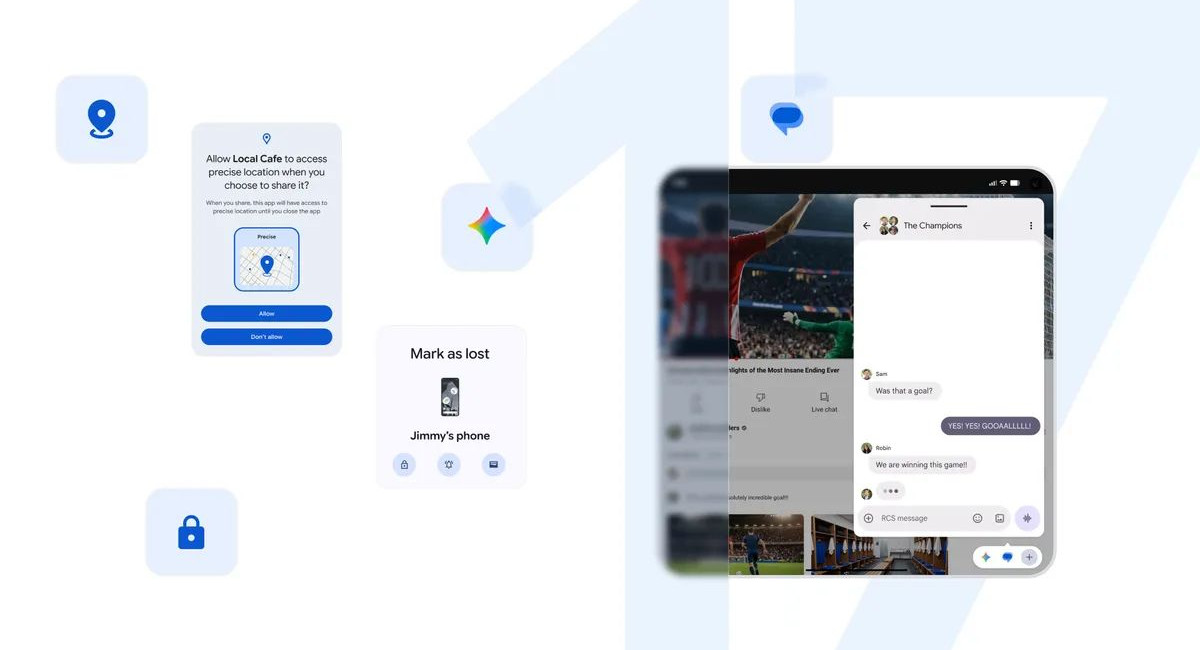
Security has received an equally meticulous overhaul, introducing granular control over sensitive user data. Apps will no longer force users into an all-or-nothing scenario when requesting access to details like the phone address book or location data. Instead, the new software allows people to share single, specific contacts with third-party messaging utilities and grant temporary, one-time precise location access.
Furthermore, device theft protection takes a major leap forward through the Find Hub, which now features an enhanced Mark as lost protocol. If a phone goes missing, owners can lock down their hardware using mandatory biometric authentication. Even if a thief manages to discover the lock screen PIN, they will remain locked out of the device settings and personal data, rendering them incapable of disabling the tracking services. This is complemented by an upgraded Live Threat Detection system that actively blocks malicious code in real-time, alongside extended timeout penalties for incorrect lock screen attempts to completely thwart brute-force attacks.
Rounding out the release are several subtle, quality-of-life adjustments aimed at aesthetic minimalism and broader device integration. Users can now hide application names entirely from the home screen for a completely clean, minimalist look. Parental Controls have also been completely decoupled from brand boundaries, ensuring that these safety features function identically across all hardware makers. Finally, the update introduces independent volume scaling exclusively for the digital assistant, alongside deeper user customization options for the system-wide dark theme, capping off an update that proves substance triumphs over style
MORE NEWS FOR YOU