
 Help & Support
 SEARCH
Google Chrome transforms productivity with new vertical tabs and reading mode
SHARE IT
The digital age has brought an endless stream of information right to our fingertips, but it has also introduced a unique modern problem known to many as tab overload. For millions of internet users across the globe, a typical browsing session often results in dozens of tiny, unreadable horizontal tabs squeezed at the top of their screens. Recognizing this widespread issue and the growing need for enhanced digital focus, Google Chrome is finally taking a significant leap forward. The world's most popular web browser has officially rolled out a highly anticipated update, introducing vertical tabs alongside a completely revamped reading mode. This strategic move is not just a cosmetic update; it represents a fundamental shift in how users manage their daily online workflows, aiming to significantly boost productivity and reduce digital clutter.
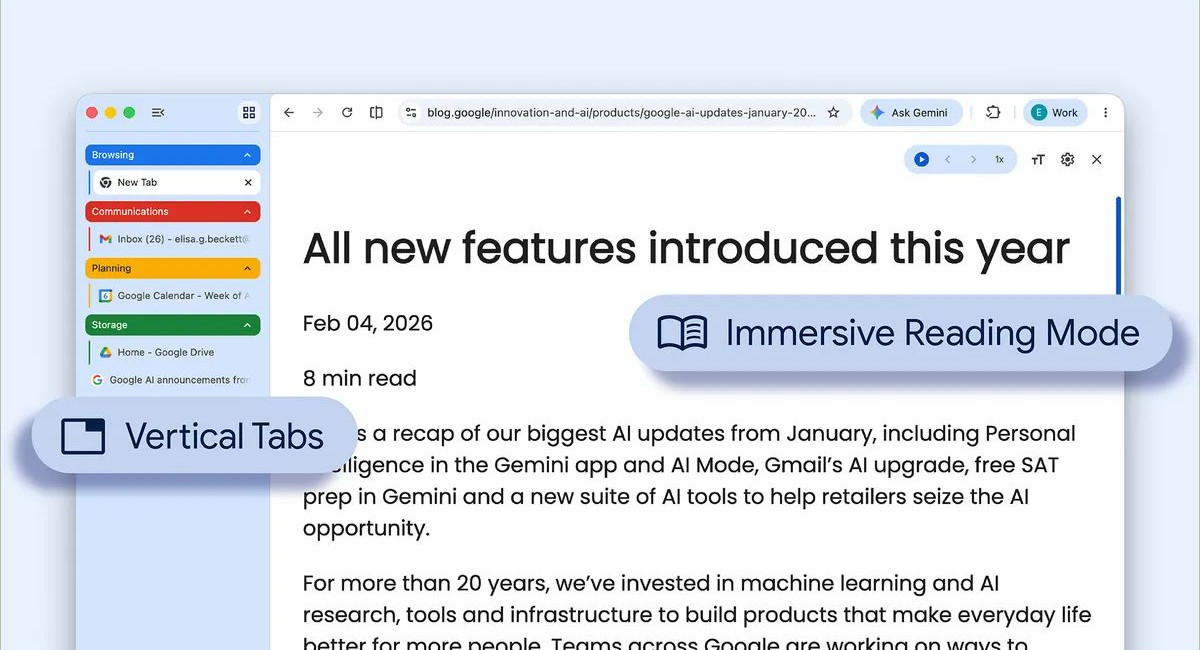
For a long time, competing browsers such as Microsoft Edge have championed the vertical tab layout, offering their users a much more organized way to handle complex browsing sessions. Google Chrome, despite its massive market share, had notably lagged behind in this specific area of user interface design. However, the tech giant is now catching up, and the integration of this feature is poised to impact a staggering number of daily active users. By moving away from the traditional horizontal bar that often leads to squished and indistinguishable web pages, the new sidebar layout provides a breath of fresh air. Users can now seamlessly transition to this new view by simply right-clicking anywhere within their active Google Chrome window and selecting the dedicated option to show tabs vertically.
The immediate benefit of this vertical arrangement is the visibility of full page titles. When tabs are stacked horizontally, opening more than a handful means the titles disappear, leaving only a tiny icon that makes navigation frustrating and time-consuming. With the sidebar approach, even if you have an extensive collection of pages open for research, work, or casual reading, the titles remain clearly legible. This design choice inherently supports better tab group management, allowing individuals to categorize and structure their workspace efficiently. It caters directly to multitaskers, professionals, and students who juggle vast amounts of information simultaneously, transforming a chaotic screen into a clean, highly structured environment.
Beyond the structural improvements of the interface, this development highlights a broader industry trend towards customizable workspaces. Users are no longer satisfied with a one size fits all approach to web browsing. They demand flexibility and tools that adapt to their specific habits. By offering vertical tabs natively, without the need for third party extensions, Google Chrome is acknowledging that the modern internet experience requires robust, built in organizational tools. This change is expected to drastically reduce the time users spend searching for that one specific tab buried among fifty others, thereby streamlining the research process and allowing for a much more fluid transition between different tasks throughout the workday.
In addition to revolutionizing tab management, Google Chrome has paid equal attention to the actual consumption of content. The internet can often be a visually overwhelming place, filled with intrusive advertisements, autoplaying videos, floating sidebars, and various other distracting elements that pull attention away from the core text. To combat this, the recent update introduces a significantly enhanced reading mode, featuring a redesigned full page interface tailored specifically for deep, focused reading. Accessing this feature is designed to be completely intuitive. Users just need to right click on the webpage they wish to read and select the option to open it in reading mode.
Once activated, this immersive mode works like a digital filter. It instantly strips away all the unnecessary visual clutter, presenting the user with a clean, text centric view. This environment is meticulously designed to foster concentration, making it ideal for consuming long form journalism, academic papers, or in depth analytical reports. By removing the noise, the browser allows the reader to engage directly with the content, enhancing comprehension and reducing the cognitive load that comes from ignoring peripheral distractions. This reading upgrade is a testament to the growing demand for digital wellness tools that help users maintain their focus in an increasingly noisy digital landscape.
While some critics might argue that Google Chrome is simply adopting features that have existed in other platforms for years, the sheer scale of its user base means these additions will have a monumental impact. This is not merely about playing catch up; it is about refining the browsing experience for the vast majority of internet users globally. The combination of a structured tab interface and a distraction free reading environment underscores a much broader initiative by the company. They are actively working to make internet navigation more purposeful and significantly less chaotic for everyone involved.
Ultimately, these seemingly minor tweaks to the user interface carry the potential to profoundly alter daily digital habits. As the competition among software developers continues to intensify, providing tools that genuinely empower the user is becoming the ultimate differentiating factor. By granting individuals greater control over how they organize information and offering effective ways to eliminate online distractions, Google Chrome is cementing its position. It is adapting to the evolving needs of the modern workforce, ensuring that it remains not just a basic tool for accessing the web, but an indispensable platform for focused, high level productivity and seamless digital exploration.
MORE NEWS FOR YOU