 Help & Support
 SEARCH
Google introduces new Gemini-powered features into Chrome for Android
SHARE IT
Google is preparing a massive upgrade for its flagship mobile browser, integrating its highly anticipated Gemini 3.1 artificial intelligence model directly into Chrome for Android. Scheduled to make its debut next month, this development represents a major step forward in turning standard web browsers into active digital assistants capable of managing productivity and multitasking on the fly.
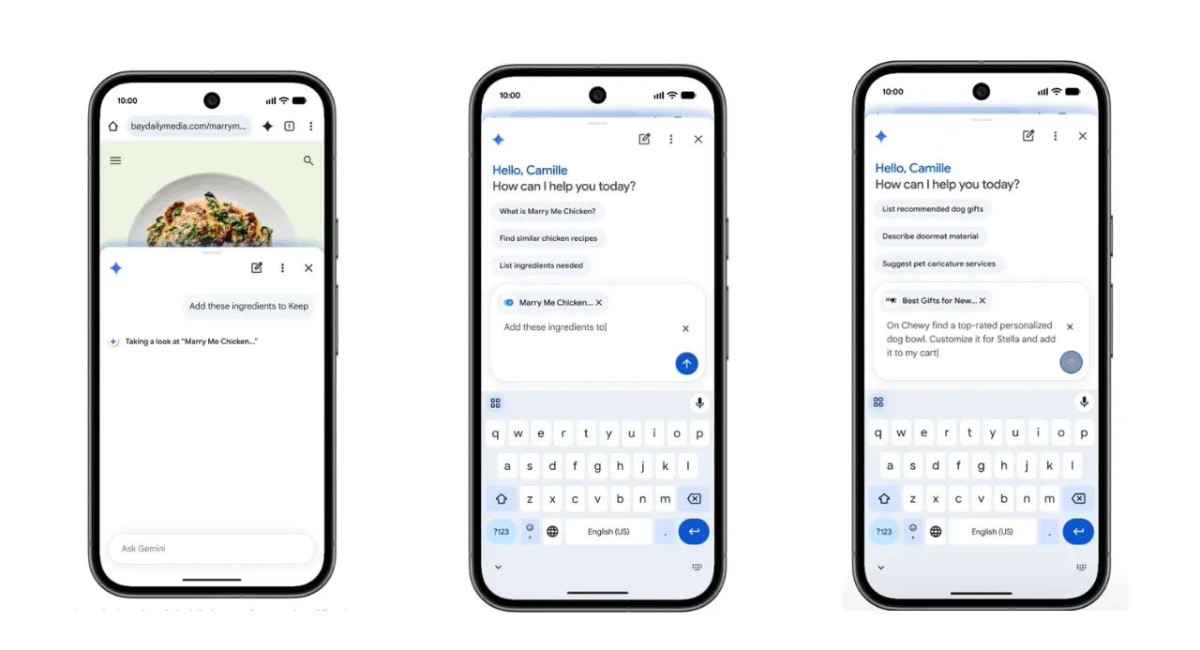
At the core of this transition is an updated interface designed to minimize the friction of mobile multitasking. Users will soon spot a new dedicated Gemini icon situated directly on the Chrome toolbar. Activating this icon summons a practical panel that slides up from the bottom of the screen, eliminating the traditional need to switch back and forth between separate applications. Once active, the integrated artificial intelligence reviews the live webpage on display, allowing individuals to instantly request summaries of lengthy articles, seek clarification on dense terminology, or ask targeted questions based on the visible content.
Beyond basic text comprehension, Google is positioning this update as a hub for ecosystem connectivity. The integrated assistant features the capability to cross-reference and interact with widely used productivity services, including Google Calendar, Google Keep, and Gmail. For instance, while reviewing a website, a user can instruct the system to schedule an upcoming event, extract a list of recipe ingredients into a personal note, or cross-check a detail with older emails. This cross-app functionality is further enhanced for users who have adopted Gemini Personal Intelligence, a feature introduced earlier this year, which allows the software to customize its responses and suggestions according to individual habits, schedules, and unique user preferences.
Visual media creation is also receiving a boost within the updated mobile browser via creative tools driven by Nano Banana. This feature grants users the ability to generate entirely new images or modify existing web elements directly inside the browser framework, effectively turning standard text-based web content into visual configurations. The arrival of Nano Banana within Chrome marks the latest step in a phased rollout across Google software infrastructure, following previous integrations into Search and NotebookLM last autumn, and a subsequently expansion into Google Photos.
Automation is taking a more prominent role through a feature known as auto browse, which is built to independently execute tedious, multi-step web tasks on behalf of the user. While these deeper, agentic capabilities represent an advanced shift in how software navigates the web, developers have emphasized that these automated routines still function strictly within the established safety guidelines and security protocols of Chrome. This design ensures that automated tasks do not compromise sensitive user data or system integrity.
The initial launch of these capabilities will follow a controlled rollout strategy. Starting toward the end of June, the baseline Gemini features in Chrome for Android will begin appearing on select devices running Android 12 and above within the United States. However, access to the more advanced automation tools, specifically the auto browse functionality, will be reserved for individuals subscribed to the premium tiers, namely the Gemini AI Pro or Gemini Ultra plans, provided they are using compatible hardware.
MORE NEWS FOR YOU