 Help & Support
 SEARCH
Netflix reinvents the mobile experience with a strategic face lift
SHARE IT
Netflix has officially begun rolling out a significant visual overhaul of its mobile application, aiming to simplify how users interact with their favorite content. Currently debuting in major markets including the US, the UK, Canada, and India, this update represents a shift toward a more ergonomic and intuitive user interface. While many changes are aesthetic, the underlying goal is clearly to keep users engaged longer by removing the friction often associated with navigating vast content libraries.
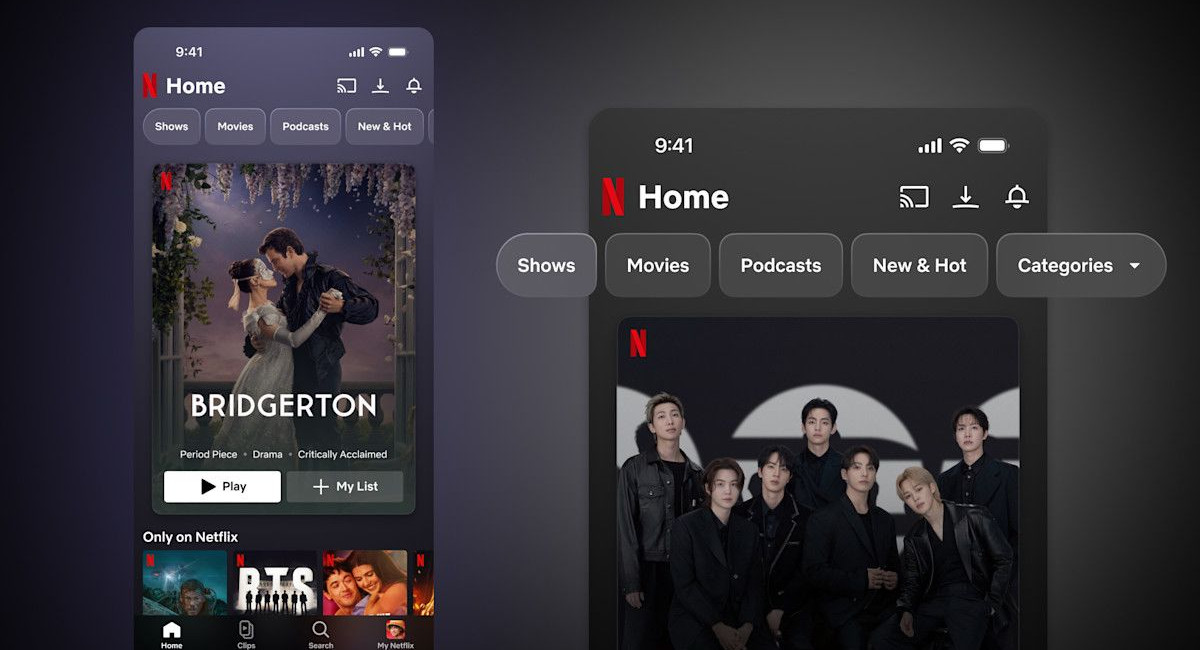
One of the most notable changes in this redesign involves the relocation of key functional elements. In a move that prioritizes ease of use, the search icon has been moved from its traditional spot in the top-right corner to a more accessible central position within the bottom navigation bar. This adjustment is far from accidental; it is a direct response to the increasing size of modern smartphones. By placing the search function within thumb’s reach, Netflix is making it easier for users to operate the app with a single hand, a small but vital quality-of-life improvement that many will immediately appreciate.
The structural changes continue at the top of the interface. The "New & Hot" section has been promoted to a more prominent position alongside categories like Movies and Shows, while the notification system has been streamlined.The familiar bell icon now sits in the top-right corner, effectively decluttering the "My Netflix" hub. Furthermore, the personalized greeting on the homepage has been replaced with a simple, clean "Home" header, signaling a move toward a more professional and less cluttered aesthetic. These tweaks suggest that Netflix is focusing on a "less is more" philosophy to prevent user overwhelm.
Perhaps the most significant addition to the app is a new feature titled Clips. Drawing inspiration from the vertical video formats popularized by platforms like TikTok, Clips offers a curated feed of short-form highlights from various movies, series, and specials. While vertical feeds have become ubiquitous in social media, Netflix is positioning this as a functional discovery tool rather than an infinite scroll designed for mindless consumption. The goal is to provide a "highlight reel" that helps viewers decide what to watch next without getting lost in a digital rabbit hole.
Functionality remains at the heart of the Clips feature. Users can instantly add titles discovered through the feed to their "My List" or share specific recommendations with friends directly from the interface. Netflix has indicated that this is only the beginning for Clips, with plans to integrate genre-based collections, live programming updates, and even podcasts into the feed in the future. This move highlights the company's ambition to transform the app from a simple playback tool into a comprehensive entertainment portal.
Despite these advancements, some long-standing user requests remain unaddressed. While the design refresh brings the mobile app in line with the major visual update seen on TV platforms last year, certain navigation hurdles persist. For instance, the ability to jump seamlessly between different title pages without having to repeatedly hit the back button is still missing. Nevertheless, the update marks a clear step forward in mobile design, blending modern social media trends with the practical needs of a global streaming audience. As the rollout expands globally in the coming months,users will soon find a more refined and thumb-friendly way to binge their favorite shows.
MORE NEWS FOR YOU