 Help & Support
 SEARCH
WhatsApp unlocks Web Calling on desktop, no app required
SHARE IT
Meta has officially launched standalone audio and video calling directly through WhatsApp Web. For years, millions of people who relied on the browser version of the messaging platform were forced to hit a frustrating wall whenever they needed to place a quick voice or video call. They were obliged to download and install the dedicated desktop application for Windows or macOS. Now, that requirement is officially a thing of the past. Users across the globe can initiate and receive both individual and group calls seamlessly without downloading a single megabyte of extra software.
This update represents a substantial leap forward in accessibility and convenience. It is particularly impactful for professionals working on locked-down corporate laptops where administrative privileges restrict third-party software installations, as well as students using shared library or campus computers. By shifting full calling capabilities straight into standard internet browsers like Chrome, Edge, Safari, and Firefox, WhatsApp is removing one of its longest-standing functional bottlenecks. Whether someone is drafting documents in one tab or researching in another, dropping into a voice chat or launching a full video conference now requires nothing more than a simple click inside the browser window.
Crucially, Meta has ensured that browser-based calling does not mean sacrificing the core feature set that users expect on mobile or native desktop apps. The new web calling interface integrates a full dedicated Calls tab, giving users immediate access to their complete call history, pending invites, and favorited contacts. Moreover, essential collaboration tools have been ported over intact. Web users can share their screens during active calls to present slides or review documents, drop real-time emoji reactions to keep conversations engaging, and coordinate multi-participant video discussions without experiencing degraded performance.
Security and privacy remain central to this expansion. Meta confirmed that all voice and video calls conducted via WhatsApp Web inherit the same rigorous end-to-end encryption that safeguards standard mobile chats. This guarantees that neither Meta nor outside third parties can intercept or listen to ongoing conversations. Furthermore, the web calling service remains completely free of charge and carries no artificial time limits, setting a clear contrast against several competing enterprise video platforms that restrict free tier meeting lengths.
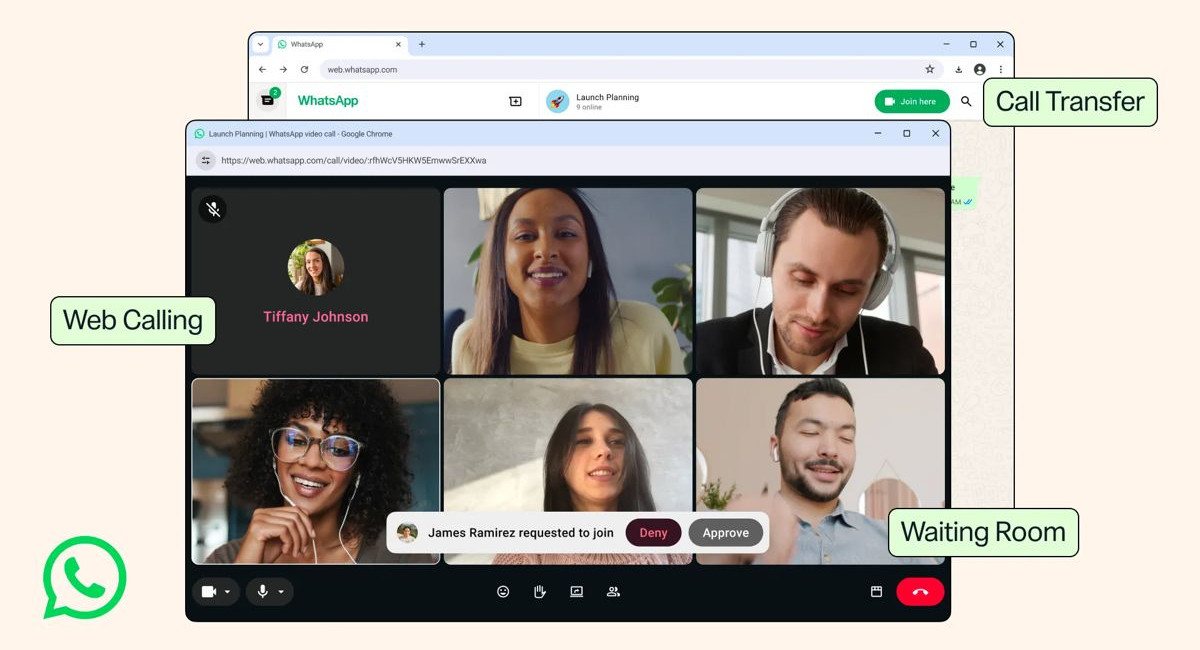
Alongside the web calling rollout, WhatsApp is introducing a suite of advanced call management enhancements designed to elevate the overall user experience across all devices. Chief among these is Call Transfer, a practical feature that allows individuals to shift an active group call from one device to another without disconnecting. A user who begins a call on their smartphone while commuting can seamlessly transfer the conversation to their laptop screen upon arriving at their desk, preserving the rhythm of the discussion without having to hang up and rejoin.
To give meeting organizers greater control over their virtual spaces, WhatsApp has also debuted a Waiting Room feature. When hosts generate a call link with approval permissions enabled, incoming participants are placed into a virtual lobby until the host manually admits them. This addition brings WhatsApp closer to professional video conferencing standards, helping prevent unwanted interruptions and securing private group discussions.
On the audio and video performance front, the platform has rolled out two key technical upgrades: QuickHD and Noise Suppression. QuickHD addresses the common issue of initial pixelation by rendering high-definition video within the very first seconds of a call establishment, rather than requiring a prolonged warmup period. Simultaneously, the newly added Noise Suppression toggle intelligently filters out disruptive ambient sounds, such as keyboard clatter, background traffic, or household noise. Users can easily toggle this setting on or off directly from the in-call menu to ensure crisp audio clarity regardless of their environment.
Taken together, these updates signal Meta's broader strategy to position WhatsApp not merely as a mobile instant messenger, but as a robust, cross-platform communications hub capable of rivaling dedicated productivity tools. By bringing effortless, secure, and feature-complete calling straight to the web browser, WhatsApp is tearing down digital barriers and making daily connectivity simpler for hundreds of millions of users worldwide.
MORE NEWS FOR YOU